Your site loads slow, Google Search Console keeps nagging you with red flags, and visitors bounce before they even see your name — been there? A lot of doctors and clinic owners deal with this. At Holinex, we fix it for clients all the time. One doctor in USA had a nice-looking site but it took 6 seconds to load. We cleaned it up — now it loads in under 2 seconds, his bounce rate dropped, and new patient calls went up noticeably. This guide is just me walking you through how to fix Core Web Vitals yourself, step by step. It’s the stuff we actually do, not theory. If you want, we can handle the heavy lifting — but let’s start with what you can do today.
What Core Web Vitals Actually Are
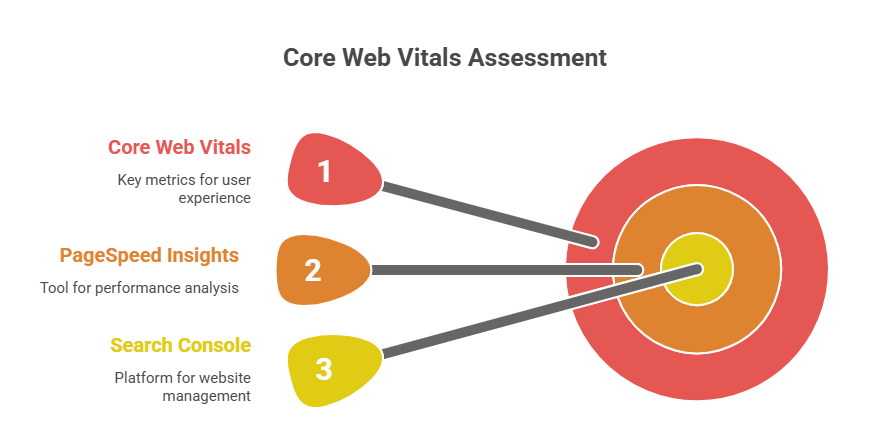
Core Web Vitals are Google’s way of judging how good your site feels to real people. They look at three things:
- Largest Contentful Paint (LCP) — how long until the main part of the page shows up
- Interaction to Next Paint (INP) — how quickly the site responds when someone clicks or taps
- Cumulative Layout Shift (CLS) — how much stuff jumps around as the page loads (annoying when buttons move)
Google says if you hit their targets (LCP under 2.5s, INP under 200ms, CLS under 0.1), you get a boost in rankings and people stay longer. For clinics in Bangladesh or the US, where patients search on phones with spotty connections, these numbers really matter.
How to Check Your Core Web Vitals First
Before fixing, see where you stand.
Go to Google’s PageSpeed Insights — paste your URL, run the test. It gives you mobile and desktop scores plus the three vitals.
Or check Search Console → Core Web Vitals report (if you have it set up). It shows real user data, which Google cares about more.
If your numbers are red or orange, don’t panic — most issues are fixable.
Fixing Largest Contentful Paint (LCP)
LCP is usually the biggest problem. It’s about how fast your main content appears.
First, find the culprit — PageSpeed tells you (often a big hero image or heavy font).
Steps we take every time:
- Compress images. Use TinyPNG or ShortPixel. One clinic had 5MB photos — compressing them cut LCP by 3 seconds.
- Use modern formats like WebP. Most tools convert for you.
- Lazy-load images below the fold. In WordPress, plugins like Smush or Jetpack do this automatically.
- Minify CSS and JS. Plugins like Autoptimize or WP Rocket combine and shrink files.
- Use good hosting. Slow server = slow LCP. For Bangladesh sites, local servers like ExonHost help a lot.
- Preload important stuff. Add this to your header: <link rel=”preload” as=”font” href=”your-font.woff2″ type=”font/woff2″ crossorigin> for fonts.
Do these, re-test. Most sites drop from 5+ seconds to under 2.5s.
Fixing Interaction to Next Paint (INP)
INP replaced FID — it’s how fast your site reacts to clicks or taps.
Common causes: too much JavaScript doing heavy work.
Steps to fix:
- Defer or async non-critical JS. In WordPress, use Async JavaScript plugin.
- Break up long tasks. If you’re technical, split big scripts.
- Reduce third-party scripts. Chat widgets, analytics — load them last.
- Use browser caching. Set cache headers for JS/CSS.
- For Bangladesh sites with slow networks, test on 3G in DevTools — fix what hurts most.
One doctor had a chat popup loading early — deferring it brought INP from 400ms to 120ms.
Fixing Cumulative Layout Shift (CLS)
CLS is when things move around while loading — ads, images, fonts.
Fixes:
- Set width and height on images. <img src=”…” width=”800″ height=”600″> — prevents jumps.
- Reserve space for ads. Use CSS placeholders.
- Use font-display: swap for custom fonts.
- Avoid inserting content above existing elements.
- For sliders/carousels, preload images.
A clinic we worked with had CLS from ads loading late — placeholders fixed it to 0.05.
Quick Checklist for Core Web Vitals Fixes
Here’s a simple list we give clients:
- Run PageSpeed Insights first
- Compress all images (aim <100KB each)
- Lazy-load off-screen images
- Minify CSS/JS
- Defer non-critical scripts
- Set image dimensions
- Use CDN for global speed
- Test on mobile (real device if possible)
Do these, re-check scores — most sites improve a lot.
Tools We Use (and You Can Too)
- PageSpeed Insights (free, Google):
- GTmetrix (free tier):
- WebPageTest (free):
- Lighthouse (in Chrome DevTools): Ctrl+Shift+I → Lighthouse tab
For Bangladesh sites, test with slow connection in DevTools — it shows real-world issues.
FAQs
What are Core Web Vitals? Answer: Google’s three metrics for site experience: load speed (LCP), responsiveness (INP), and stability (CLS).
How do I check Core Web Vitals? Answer: Use PageSpeed Insights or Google Search Console — both free.
Do Core Web Vitals affect rankings? Answer: Yes — Google uses them as part of ranking since 2021, especially on mobile.
How long does it take to fix Core Web Vitals? Answer: DIY fixes can take a few hours to days. Professional help usually 1–4 weeks.
Does Holinex fix Core Web Vitals? Answer: Yes — it’s part of our website optimization. Contact us for a free quick check.
Ready to Make Your Site Faster?
Fixing Core Web Vitals isn’t magic — it’s small changes that add up. Slow sites lose patients and customers every single day.
If DIY feels like too much, our team at Holinex handles this for clinics and practices all the time.
Drop us a message on the contact page or LinkedIn — we get back quick.