Website is sitting on page 3 or 4 and you’re wondering why nobody can find you. I hear this from almost every new client. They have a good service or product, but Google just ignores them. The good news is that ranking higher isn’t some mysterious secret anymore — it’s a bunch of small, consistent things you can do. These are the tips we actually use when we help clients move up. Nothing complicated, nothing that costs a fortune, just stuff that works in 2026.
First — Check Where You Stand Right Now
Before you change anything, see what Google thinks of your site today.
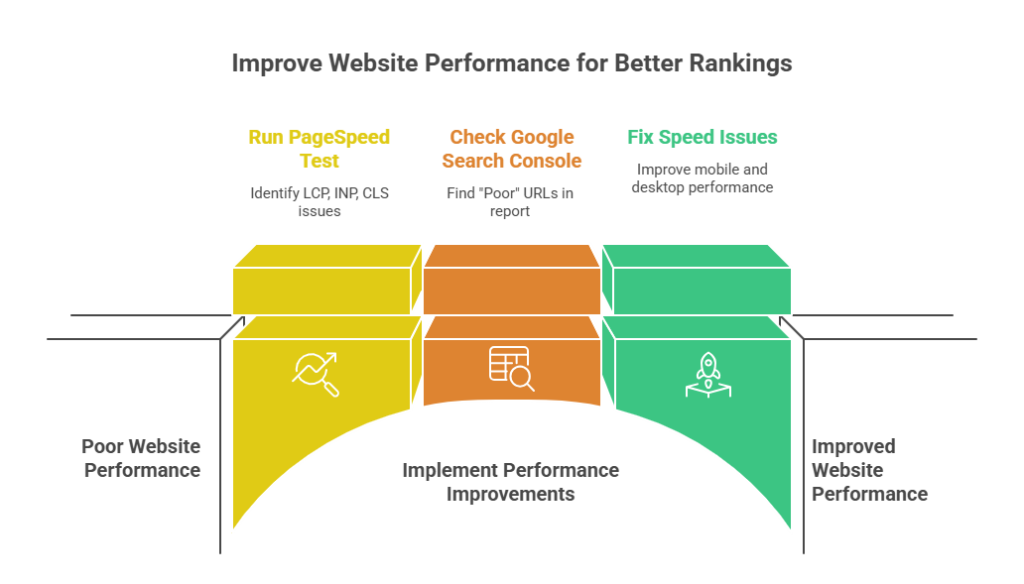
Go to this free tool: https://pagespeed.web.dev/ Put your homepage URL in and run the test for mobile and desktop. Look at the three numbers at the top: LCP, INP, CLS. If any are red or orange, fix them first — Google cares about them a lot.
Also log into Google Search Console (if you haven’t, set it up — takes 5 minutes). Go to the “Core Web Vitals” report. It shows real user data, not just lab tests. If you see “Poor” URLs, those are the ones dragging you down.
We did this for a dentist client. His mobile score was terrible. We fixed speed first, then his local rankings started climbing within weeks.
Make Your Site Load Fast on Phones
Most people search on their phone. If your site takes more than 3 seconds to load on mobile, Google pushes you down and visitors leave.
What usually slows things down:
- Huge images (the hero photo on your homepage is often 3–5 MB)
- Too many plugins or scripts loading
- No caching
- Cheap hosting that’s slow
Quick fixes that actually help:
- Compress images. Use TinyPNG.com — free and easy. One client had 8 MB images; after compression LCP dropped from 6 s to 1.9 s.
- Turn on lazy loading. In WordPress, plugins like Smush or Jetpack do this for you.
- Minify CSS and JavaScript. Use Autoptimize or WP Rocket — combines files and removes extra space.
- Use a CDN. Cloudflare’s free plan speeds up delivery worldwide.
- Switch hosting if needed. For Bangladesh sites, local hosts like TigerIT or ExonHost usually beat international shared hosting.
Do these and re-test in PageSpeed. Most sites improve 20–50 points just from speed.
Write Pages People Actually Want to Read
Google ranks pages that answer questions well and keep people on them.
Don’t write for Google — write for the person searching.
Practical tips that work:
- Put the answer in the first paragraph. If someone searches “best dentist in Dhaka”, say right away why you’re good.
- Use short paragraphs. 2–4 lines max.
- Add headings (H2, H3) with real questions people ask.
- Use bullet lists — people scan.
- Add photos of your clinic, team, before/after work. Give them alt text like “dentist clinic in Dhaka waiting room”.
- Keep pages 1,200–2,000 words if the topic needs it, but only if every sentence adds value.
We wrote a page for a lawyer about “how to choose a divorce lawyer”. It ranked top 5 because it answered everything honestly, not salesy.
Get Some Real Links (Not Spammy Ones)
Links from other sites still help Google trust you.
What works in 2026:
- Claim and fill out Google Business Profile — huge for local rankings.
- Get listed on local directories (Facebook, Yellow Pages, your city chamber).
- Ask happy clients for a link on their website.
- Write something useful (guide, checklist) that other sites want to link to.
- Guest post on relevant blogs in your niche.
Avoid buying links or mass directories — Google punishes that fast now.
Keep Your Content Fresh
Google prefers pages that get updated.
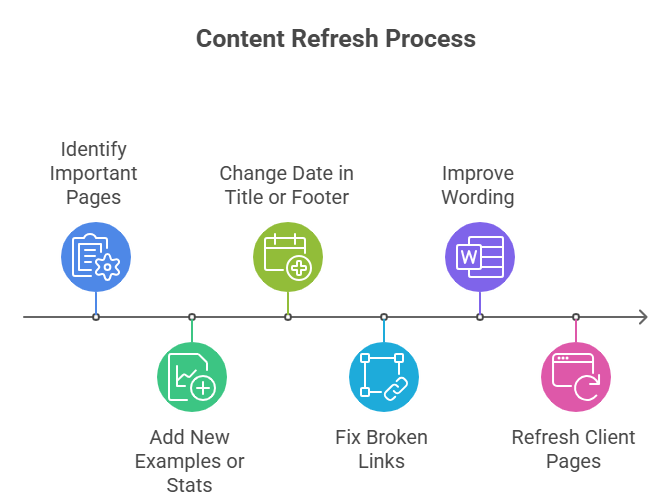
Every 4–6 months, go back to your important pages:
- Add new examples or stats
- Change the date in the title or footer
- Fix broken links
- Improve wording based on what people are asking now
We refresh client pages regularly — it keeps rankings from dropping and sometimes pushes them higher.
Quick Checklist to Start Ranking Higher
- Run PageSpeed Insights and fix red scores
- Mobile-friendly site (test it)
- Title and meta description with main keyword
- Useful content that answers questions
- Google Business Profile complete
- A few real links from local/relevant sites
- Update pages every few months
Do these consistently and you’ll move up. It takes time — usually 3–6 months to see real movement — but it’s the honest way.
If you don’t have time to do it yourself, we help with this every day at Holinex. Send a quick message here [contact page] or on LinkedIn — we’ll take a look and tell you what’s worth fixing first.
About the Author:

This blog is written by Holinex Digital, a leading full-service digital and creative marketing agency specializing in result-driven, data-driven strategies for online growth. With expertise in digital marketing, Holinex helps businesses achieve measurable success through practical and innovative digital marketing solutions. Holinex always believes in making a meaningful community that is open-minded to help each other to grow up together. so, please follow & Keep in touch with Holinex Digital.
Please see our Reviews on Google or TechBehmoth to know what the client says about holinex Digital